


Amazon Music: Songs & Podcasts
Amazon Mobile LLC
I spent time with Amazon Music as an everyday listening app rather than treating it as a simple place to press play. It brings music and podcasts into the same Music & Audio space, and that combination makes it useful in some routines while also creating a busier experience than a dedicated podcast player. My main question was not only whether I could find something good to hear, but how comfortably different people could navigate, read, control, and use it in real situations.
The app is free to install, comes from Amazon Mobile LLC, and is marked for Teen audiences. Its scale is hard to ignore: it has passed 100 million installs, with an average rating of 3.7 from around 3.3 million ratings and roughly 489 thousand written reviews. Those figures suggest a widely used service with plenty of opinions around it, rather than a niche audio tool. In my experience, its biggest strength is convenience: it puts familiar songs, changing playlists, podcasts, and personal listening habits in one place.
How clearly the app supports different listeners
Readability and navigation in daily use
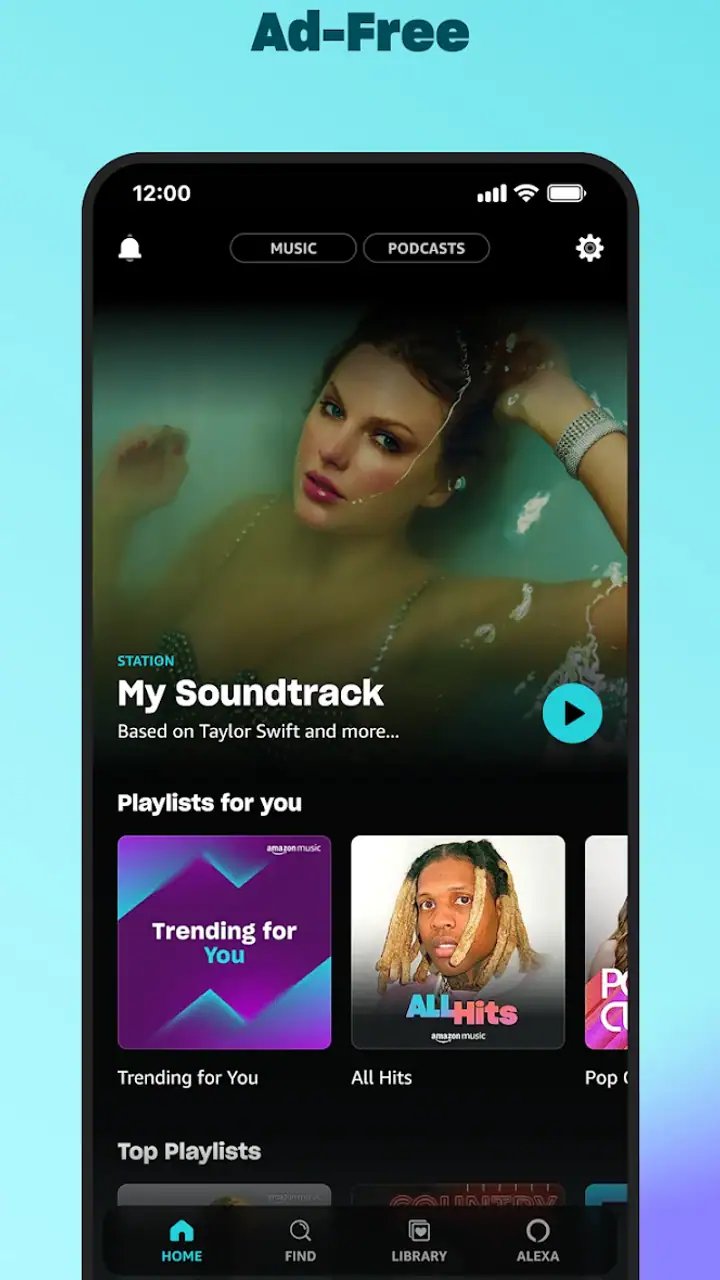
The first thing I noticed is that the app is built around discovery. Instead of opening to an empty library, I was encouraged toward music and spoken audio that could be played quickly. That is helpful when I am cooking, commuting, or getting ready in the morning and do not want to build a queue from scratch. It also means the screen can feel crowded when I only want one specific album or podcast.
Related News

For someone who reads comfortably on a phone, the main areas are understandable after a short period of use. I could move between recommendations, search, and saved listening without needing to learn a complicated audio workflow. The challenge is that visual hierarchy matters a lot: promotional suggestions, categories, controls, and content cards compete for attention. A person with reduced vision, reading fatigue, or difficulty filtering visual information may need more time to identify the control or result that matters.
I found search more dependable than browsing when I already knew what I wanted. Typing an artist, song, or podcast title reduced the amount of scrolling and made the experience more predictable. For a listener who relies on large text or magnification, that approach is also more practical than scanning several rows of artwork. The trade-off is that search depends on entering enough of the name correctly, and a small spelling mistake can make the result-finding process less comfortable.
Related News

Instagram Is No Longer a Photo App. It Is an Attention Engine

Microsoft Teams Mobile: When Collaboration Becomes Navigation

How the NFL App Adapts to Android and iOS Updates

Temu: Elevate Your Shopping Experience to Billionaire Status

Why Traffic Rider Works Best as a Precision Reflex Game

How Google’s Find Hub Transforms Everyday Searches
The artwork is attractive, but it is not always the clearest way to distinguish items. Album covers and podcast images can look similar when displayed in a long feed, especially for someone who does not process small visual differences easily. I would recommend using recognizable titles and the search field as the primary route, rather than expecting the artwork alone to communicate what each card contains.
There is also a difference between choosing content and controlling it. Starting an album or podcast is straightforward, but once audio is playing, the listener may need to locate the mini-player and expand it before all useful controls are visible. That extra step is minor for me, yet it can matter to anyone who has difficulty with precise taps, visual tracking, or remembering where a control moved.
Motor and sensory considerations
Audio apps are often judged by sound quality and catalog size, but control effort matters just as much. Amazon Music works best when I can prepare a listening session before my hands are occupied. I can select something in advance, start playback, and leave the phone alone while washing dishes or carrying groceries. That simple workflow is more inclusive than repeatedly reaching for a small screen.
Gallery
For users with limited dexterity, the main friction comes from touch interaction. Browsing cards, opening a player, changing a selection, and moving through a long list all require deliberate taps and swipes. I would not describe the interface as unusually difficult, but it is still a touch-first experience. People who depend on larger physical controls, switch access, or highly simplified layouts should test the app with their device’s own assistive settings before making it their primary player.
People who are sensitive to visual movement or busy screens may prefer a more intentional routine. Rather than continuing to browse recommendation rows, I found it calmer to search for a known artist or open a saved choice. This reduces the amount of changing imagery and makes the session feel less like shopping for audio. The same habit helps anyone who gets distracted by too many options.
On the listening side, the app can suit people who want to avoid constant visual attention. Once playback is underway, the phone can stay out of sight, which is useful for listeners who find prolonged screen use tiring. However, the app still requires visual or touch interaction for many changes. If a listener needs every task to be completed without looking at the display, the experience may depend heavily on the phone’s operating-system tools and the person’s comfort with voice or accessibility controls.
Podcasts introduce a different sensory issue from music. Spoken audio can be easier to follow at a steady volume than a song with changing dynamics, but long episodes demand sustained attention. I found the service more comfortable when I chose content that matched the moment: music for repetitive chores, a familiar podcast for a walk, and shorter listening sessions when concentration was limited. That is not a special feature, but it is an important way to use the combined catalog without exhausting myself.
Situational access: where it fits and where it does not
A realistic example is a morning commute. I can search for a podcast or playlist before leaving, start it while still stationary, and then keep the phone in my pocket. That is the right kind of use for this app: preparation first, passive listening afterward. I would avoid browsing while walking, cycling, driving, or crossing streets. The convenience of a large audio catalog is not worth dividing attention from the environment.
At home, the app is useful when I want background sound without switching services. I might begin with music while cleaning, then move to a podcast during a quieter task. Having both formats together saves a separate app and keeps my listening history in one general place. The downside is that the very same convenience can encourage unnecessary browsing, especially when I am tired and only wanted something familiar.
For shared spaces, headphones and the phone’s volume controls become more important than the catalog itself. A listener with hearing loss may need to rely on personal device settings, headphones, or other audio equipment that works well for them. I would not assume that the app alone solves individual hearing needs. Its role is mainly to provide the content and playback interface; the final listening experience depends heavily on the device and accessories.
For children or family use, the Teen content rating is worth noticing. I would not hand the app to a younger child without checking what they can access and how independently they can navigate it. The rating does not make the service unsuitable for every family, but it does mean parents should treat it as a general audio platform rather than an automatically child-focused environment.
People with limited connectivity should plan their listening carefully and check how the app behaves for their preferred content before relying on it away from home. I would not begin an important journey assuming that any desired album or episode will be available exactly when needed. Preparing a familiar listening choice in advance is the safer habit, particularly for someone who finds last-minute searching stressful or difficult.
Practical workflows that make the experience easier
My most useful adjustment was separating discovery from playback. When I have energy, I browse and search for new material. When I am busy, I go directly to something I already recognize. This two-mode approach reduces the number of decisions and makes the app more usable for people who experience decision fatigue, attention difficulties, or visual overload.
I also recommend building a small set of dependable listening choices instead of depending entirely on the home screen. A saved album, a familiar artist, or a regular podcast gives me a reliable starting point when recommendations are not relevant. This is especially helpful for someone who wants predictable audio rather than a constantly changing stream of suggestions.
Another practical tip is to check the full player before beginning an activity that leaves little room for phone handling. I prefer to confirm what is playing and make any needed changes while I am seated. That avoids trying to find a control later with one hand or under poor lighting. It is a small preparation step, but it improves access for people with motor limitations as well as anyone using the app in a moving or distracting environment.
The combined music-and-podcast design also creates a useful choice for energy levels. Music can provide a simple rhythm when I do not want to follow a conversation. A podcast can give structure to a longer task when I want spoken company. Switching between those formats is one of the clearest reasons to choose this service over an app focused only on one type of audio.
Remaining barriers and trade-offs
The biggest barrier is not a lack of content; it is the amount of visual and navigational competition surrounding that content. Recommendations are helpful when I want ideas, but they can make a direct task feel less direct. Someone with cognitive disabilities, low vision, or limited patience may prefer a simpler player with fewer discovery layers.
There is also a difference between free access and the complete experience. The app itself costs nothing to install, but in-app purchases are listed at $11.99 per item. That matters when deciding whether the service fits a budget or whether a listener wants uninterrupted access to everything they expect. I would examine the available listening options in my own account before committing to it as my only audio service.
Compared with a dedicated podcast app, Amazon Music feels broader but less narrowly focused. A podcast specialist may make episode management, subscriptions, and long-form listening feel more central. Compared with a music service built primarily around albums and playlists, this app has the advantage of bringing spoken audio into the same destination, though that can make music discovery feel less focused. The better choice depends on whether variety or specialization matters more to you.
People who want very fine control over their personal music library may also find the experience less satisfying than a service designed around local files or detailed collection management. I prefer Amazon Music when I want quick access to mainstream listening habits and podcasts, not when I want to organize every track with the precision of a personal archive.
Accessibility features built into the phone may improve the experience, but I would not treat that as proof that every screen or control will work equally well for every person. The sensible approach is to try the app with the text, magnification, voice, contrast, and input settings already used in daily life. If navigation becomes tiring even after that adjustment, a simpler audio player may be a better and kinder choice.
Who should choose it?
I think Amazon Music is a good fit for listeners who want one familiar place for songs and podcasts, especially those who value quick recommendations and do not want to maintain separate services. It also suits people who often move between active listening and background audio. The free entry point makes it easy to try without turning the decision into a major commitment, while the optional purchases mean the longer-term cost deserves attention.
I would be more cautious if you need an exceptionally uncluttered interface, depend on large and obvious controls, or want a podcast-first workflow. It may also be the wrong choice if your priority is meticulous personal-library management rather than convenient access to a broad listening environment. In those cases, a specialized alternative can reduce friction even if it does not combine as many audio types.
For older listeners or anyone helping another person set up the app, I would begin with a short routine: configure the phone’s preferred display and input settings, search for a known artist or show, start playback, and practice returning to the player. That test reveals more than a quick glance at the home screen. If the person can repeat the routine comfortably, the app may work well; if every session requires assistance, its broad catalog may not compensate for the interface effort.
My inclusive verdict
After using it as both a music player and a podcast destination, I see Amazon Music: Songs & Podcasts as a convenient but visually busy option. Its strongest inclusive quality is situational: I can prepare audio, put the phone away, and choose between music and spoken content according to my energy and surroundings. That flexibility supports many everyday routines without demanding constant screen time.
Its weaker side is the work required before playback becomes effortless. Searching is usually the most dependable route, while open-ended browsing can be tiring for people who need clear structure or fewer visual choices. Touch controls and changing content areas may also create barriers for users with motor, sensory, or cognitive needs. Those are not reasons to reject the app automatically, but they are reasons to test it in the exact conditions in which it will be used.
My recommendation is straightforward: try it if you want a broad, free-to-start audio app and appreciate having music and podcasts together. Set up a few predictable listening paths, prepare playback before demanding activities, and use the phone’s accessibility settings as part of the evaluation. Skip it in favor of a simpler or more specialized player if clean navigation, detailed podcast management, or highly controlled library organization matters more than variety.
Overall, I would recommend it to a friend who wants convenience and is comfortable with a modern, discovery-heavy interface. I would not present it as universally effortless. The right test is whether you can reach familiar audio, control it safely, and return to it without strain; if that answer is yes, the app can become a practical part of an inclusive listening routine.
FAQs for Amazon Music: Songs & Podcasts
What features does Amazon Music offer for free users?
Amazon Music provides several features for free users, including access to thousands of stations and top playlists. While the free version includes ads, it offers a selection of popular songs and playlists that can be streamed on-demand. However, offline listening and unlimited skips are only available to premium subscribers.
How does Amazon Music differ from Amazon Music Unlimited?
Amazon Music Unlimited is a premium subscription service offered by Amazon. It provides ad-free listening, unlimited song skips, and access to a larger library of over 75 million songs. In contrast, the regular Amazon Music app offers a more limited selection with ads and fewer features for free users.
Is it possible to download songs for offline listening on Amazon Music?
Yes, but this feature is only available to Amazon Music Unlimited subscribers. With a subscription, users can download songs, albums, and playlists for offline listening. This is particularly useful for those who want to save on data usage or listen in areas with no internet connection.
Does Amazon Music offer podcast streaming, and are there any exclusive shows?
Amazon Music includes a wide range of podcasts covering various genres, from news to entertainment. The platform also offers exclusive podcasts that are only available to Amazon Music users, providing unique content that can't be found on other services. This makes it a great choice for podcast enthusiasts.
Can I integrate Amazon Music with Alexa devices, and what are the benefits?
Yes, Amazon Music integrates seamlessly with Alexa-enabled devices. Users can control playback, request specific songs, and explore new music using voice commands. This hands-free experience enhances convenience, especially for those who use Alexa devices throughout their homes, allowing for easy access to music anytime.
Pros
- Extensive music library with diverse genres.
- Offline playback for on-the-go listening.
- Seamless integration with Alexa devices.
- High-quality audio streaming options.
- Personalized playlists and recommendations.
Cons
- Limited features in the free version.
- Occasional app crashes reported by users.
- Subscription required for full access.
- Some regions have restricted content.
- Interface may feel cluttered for some.


